이번에 학교에서 LDA 모형을 개선하여 토픽 모델링 하는 사업을 맡게 되었다.
데이터는 Visual Genome 사이트의 img, json 파일들을 이용하였고, 기존에 전처리 되어있는 파일에서 뽑아 Gensim에 LDA 모형을 돌려보기로 했다.
LDA란?
LDA란 주어진 문서에 대하여 각 문서에 어떤 주제들이 존재하는지에 대한 확률모형입니다. LDA는 토픽별 단어의 분포, 문서별 토픽의 분포를 모두 추정해 냅니다.
DataSet
https://visualgenome.org/api/v0/api_home.html
Visual Genome API
visualgenome.org
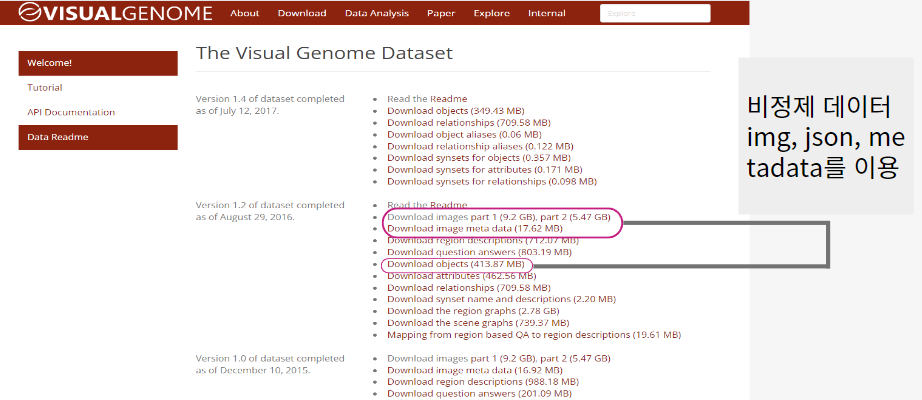
- 이미지 파일이 2개의 폴더로 나누어져서 1개의 폴더로 옮겨 담는 작업을 python 코드로 진행
import os
import shutil

file_source_1 = 'C:\\Users\\kusa1\\Desktop\\pythonProject1\\VG_100K'
file_source_2 = 'C:\\Users\\kusa1\\Desktop\\pythonProject1\\VG_100K_2'
file_destination = 'C:\\Users\\kusa1\\Desktop\\pythonProject1\\data\\VG_100K'

get_files = os.listdir(file_source_1)

for g in get_files:
    shutil.move(os.path.join(file_source_1, g), file_destination)

get_files = os.listdir(file_source_2)

for g in get_files:
    shutil.move(os.path.join(file_source_2, g), file_destination)
기존 코드의 동작과정
https://www.figma.com/file/atN8CQKrxuFehsbItehOs6/Flow-Charts-(Community)?node-id=0%3A1
Figma
Created with FigJam
www.figma.com
해당 코드는 전처리(문서화), 단어 토큰화, 시각화가 잘 되어있다.
기존 코드 git 주소 : https://github.com/pyapyapya/Image_Annotation_Modeling_with_Topic_Modeling
GitHub - pyapyapya/Image_Annotation_Modeling_with_Topic_Modeling: Image Annotation Modeling with Topic Modeling
Image Annotation Modeling with Topic Modeling. Contribute to pyapyapya/Image_Annotation_Modeling_with_Topic_Modeling development by creating an account on GitHub.
github.com
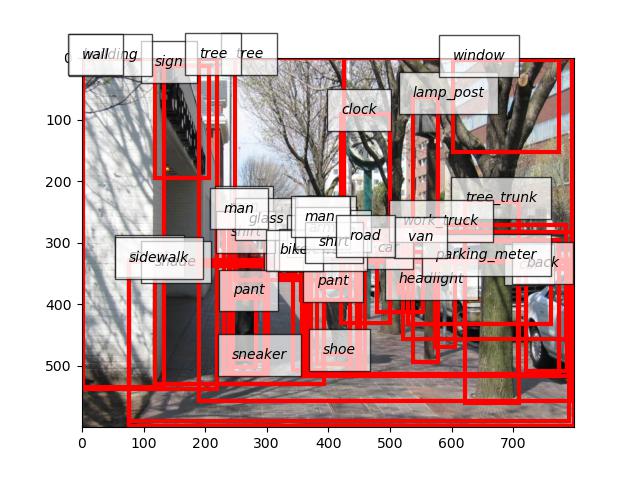
전처리, 토큰화를 끝내면 제일 첫 번째 이미지의 라벨링된 결과 이미지가 나온다. 이후 콘솔 창에 이미지의 번호를 적으면 해당 이미지를 찾아 시각화 해주는 코드로 이루어져 있다.
해당 데이터를 가지고 LDA 모형을 돌리기 위해서 Gensim 라이브러리를 이용한다.
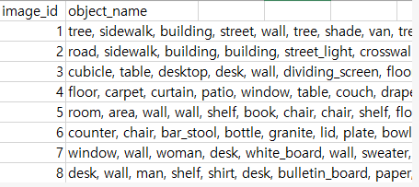
필요한 DataSet
1. Load DataSet
import pandas as pd
from gensim import corpora
import gensim
import pyLDAvis
import pyLDAvis.gensim_models as gensimvis
from gensim.models.coherencemodel import CoherenceModel

df = pd.read_csv('./data/words.csv')
2. Tokenized
tokenized_doc = df['object_name'].apply(lambda x: x.split(', '))  # 토큰화
print(tokenized_doc)
3. Make Word Dictionary
dictionary = corpora.Dictionary(tokenized_doc)
print(dictionary)
4. Gensim LDA format 형식 맞추기 (corpus)
corpus = [dictionary.doc2bow(text) for text in tokenized_doc]

print(corpus[0]) # 0번째 문서의 (단어id, 빈도수) list 형태로 출력
print(dictionary[3]) #3번째 단어 출력
5. LDA 모델 훈련
NUM_TOPICS = 20
model = gensim.models.ldamodel.LdaModel(corpus, num_topics=NUM_TOPICS, id2word=dictionary)
topics = model.print_topics(num_words=4)
for topic in topics:
    print(topic)
6. 시각화
# Visualization to html
vis = gensimvis.prepare(model, corpus, dictionary)
pyLDAvis.save_html(vis, 'LDA_Visualization.html')

# Visualization to notebook
pyLDAvis.enable_notebook()
vis = gensimvis.prepare(model, corpus, dictionary)
pyLDAvis.display(vis)
6-1. 시각화된 html ( 동적 )
해석 : NUM_TOPICS 주제를 20개로 정해서 랜덤한 20개의 주제를 LDA 모델에서 단어와 빈도 수로 html 파일로 나타내준다. 해당 단어들의 빈도 수로 이 문서는 어떤 것을 가르킨다. 하지만 그 주제가 무엇인지는 LDA 모델만 알고 있으며, 나는 알 수 없다. 그래서 나는 해당 단어와 빈도 수를 가지고 주제를 유추해낼 수 있다.
7. 문서화
def make_topictable_per_doc(ldamodel, corpus):
    topic_table = pd.DataFrame()

    # 몇 번째 문서인지를 의미하는 문서 번호와 해당 문서의 토픽 비중을 한 줄씩 꺼내온다.
    for i, topic_list in enumerate(ldamodel[corpus]):
        doc = topic_list[0] if ldamodel.per_word_topics else topic_list
        doc = sorted(doc, key=lambda x: (x[1]), reverse=True)
        # 각 문서에 대해서 비중이 높은 토픽순으로 토픽을 정렬한다.
        # EX) 정렬 전 0번 문서 : (2번 토픽, 48.5%), (8번 토픽, 25%), (10번 토픽, 5%), (12번 토픽, 21.5%),
        # Ex) 정렬 후 0번 문서 : (2번 토픽, 48.5%), (8번 토픽, 25%), (12번 토픽, 21.5%), (10번 토픽, 5%)
        # 48 > 25 > 21 > 5 순으로 정렬이 된 것.

        # 모든 문서에 대해서 각각 아래를 수행
        for j, (topic_num, prop_topic) in enumerate(doc):  # 몇 번 토픽인지와 비중을 나눠서 저장한다.
            if j == 0:  # 정렬을 한 상태이므로 가장 앞에 있는 것이 가장 비중이 높은 토픽
                topic_table = topic_table.append(pd.Series([int(topic_num), round(prop_topic, 4), topic_list]), ignore_index=True)
                # 가장 비중이 높은 토픽과, 가장 비중이 높은 토픽의 비중과, 전체 토픽의 비중을 저장한다.
            else:
                break
    return(topic_table)

topictable = make_topictable_per_doc(model, corpus)
topictable = topictable.reset_index() # 문서 번호을 의미하는 열(column)로 사용하기 위해서 인덱스 열을 하나 더 만든다.
topictable.columns = ['문서 번호', '가장 비중이 높은 토픽', '가장 높은 토픽의 비중', '각 토픽의 비중']
print(topictable[:10])

topictable.to_csv("./data/ldamodel.csv", encoding='utf-8-sig')
8. 결과 값 확인
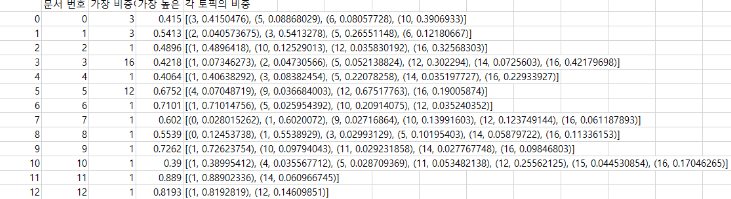
문서 번호에서 빈도 수가 높은 값을 4개까지 표현한 후 각 weight를 알 수 있다.
향후 과제
1. python 코드 class로 만들기
2. LDA 모델을 개선하기 위해 좌표값, 면적값 활용 방안 찾기
'AI' 카테고리의 다른 글
| Gensim Functions (0) | 2022.09.04 |
|---|---|
| Gensim 사용법[정리] (0) | 2022.09.04 |
| Yolov5 Window Environment (0) | 2022.08.04 |
| Tensorflow 공부 (2차) (0) | 2022.02.22 |
| Tensorflow 공부 (1차) (0) | 2022.02.22 |